

- What is Whimsical?
- Getting started with flowcharts
- Getting started with mind maps
- Getting started with wireframes
- Getting started with docs
- What can you do with Whimsical?
- Using Whimsical Boards
- Getting to know Whimsical - video guide 🎥
- Working with Whimsical’s infinite canvas - video guide 🎥
- 5 ways to create a new file
- Getting started with Whimsical AI
- How to create a new workspace
- How to use AI-assisted mind mapping
- Customizing file and folder icons
- Mentions in Whimsical files
- Customizing diagram shapes
- Getting started with sequence diagrams
- Commenting in Whimsical files
- Getting started with flowcharts
- Getting started with mind maps
- Getting started with wireframes
- Using Whimsical Boards
- Mentions in Whimsical files
- Customizing diagram shapes
- Using sections on the Whimsical canvas
- Sketch on the canvas with freehand drawing
- Annotating files for more detail
- Text-to-object pasting options
- Adding and displaying links in Whimsical files
- Linking to sections and objects
- How to draw a line
- How to filter selected objects
- Presenting in Whimsical
- Voting on task cards and sticky notes
- Using the timer in boards
- Working with the grid and auto-alignment
- Working with connectors
- Does Whimsical have cloud architecture icons?
- Using tables in Whimsical
- Using sticky notes in boards
- Optimizing performance in larger files
- Embedding external content into Whimsical
- Using spellcheck
- Setting custom thumbnails
- How overlays work in Wireframe mode
- Hiding cursors while collaborating
- Measure between objects in Boards
- Uploading files to Whimsical
- Getting started with sequence diagrams
- Commenting in Whimsical files
- Getting started with docs
- Mentions in Whimsical files
- Text-to-object pasting options
- Adding and displaying links in Whimsical files
- Linking to sections and objects
- Using tables in Whimsical
- Embedding external content into Whimsical
- Using spellcheck
- Changing page width and text size in Docs
- Collapsing text with toggles
- How to create a new workspace
- Requesting file access
- Workspace discovery settings
- Sorting files and folders
- Changing workspace members’ roles
- Adding and removing members
- Creating and managing teams
- Requesting workspace editor access
- Linking between files
- Member roles in Whimsical
- How to delete a workspace
- How to upgrade your workspace
- Guest access
- Renaming your workspace
- Offboarding users
- Consolidating workspaces
- Uploading files to Whimsical
- Organizing your work with tabbed folders
- SAML
- Setting up SAML session expiry
- Security
- Prevent new workspace creation
- Customizing file and folder icons
- How to draw a line
- How to filter selected objects
- Does Whimsical have cloud architecture icons?
- How overlays work in Wireframe mode
- Moving and copying files
- Using Whimsical on mobile
- Does Whimsical have a dark mode?
- File version history
- Why are the colors of some elements toned down?
- Does Whimsical support offline mode?
- Teams, workspaces & sections explained
- Does Whimsical work on iPad?
- Free viewers commenting in workspaces
- Syntax highlighting in code blocks
- Whimsical desktop app
- Is Whimsical available in other languages?
- Inverting the zoom direction in Whimsical so it works more like Sketch
- Troubleshooting issues and reporting bugs
- How to add emojis
- Team FAQs
- How to restore deleted files from the trash
- Searching in your Whimsical workspace
- Organizing files in your workspace
- I’ve upgraded but still don’t have access to the paid features
- Why can't I edit my files?
- Reporting content in Whimsical
- Does Whimsical have an affiliate or referral program?
- Collaborating with others in real time
- Sharing files and managing access permissions
- Hiding cursors while collaborating
- How to switch between workspaces
- Sharing feedback and feature requests
- Embedding & integrating boards with Jira Issues
- Integrating Whimsical with Google Docs
- Embedding files in ClickUp views
- Embedding files in Asana
- Embedding Whimsical files
- Whimsical AI Diagrams for ChatGPT
- Creating Jira & Confluence Smart Links for Whimsical Files
- Embedding files in Guru
- Embedding files in Trello
- Embedding & integrating boards in Notion
- Integrating Whimsical and GitHub
- Embedding files in Zendesk
- Support Whimsical embeds in your app with EmbedKit
- Whimsical previews and notifications in Slack
- Embedding files in Canva
- Integrating Whimsical and Linear
- Embedding files in Nuclino
- Embedding files in Monday
- Embedding files in Medium
- Embedding files in Slab
- Embedding files in Coda
- Whimsical API (Beta)
- SAML
- SAML SSO in Whimsical
- SAML SSO with Okta
- SAML SSO with Auth0
- SAML SSO with OneLogin
- SAML SSO with Microsoft Entra ID (Azure AD)
- SAML SSO with Google Workspace (previously G-Suite)
- SAML SSO with Active Directory Federation Services (ADFS)
- SAML SSO with other identity providers
- Setting up SAML session expiry
- Managing email changes with SAML and SCIM
- SCIM
- Setting up SCIM with Okta
- Setting up SCIM with JumpCloud
- Setting up SCIM with Entra ID (Azure AD)
- SCIM provisioning with Groups in Okta
- SCIM user provisioning in Whimsical
- SCIM provisioning with Groups in Entra ID (Azure AD)
- Security
- Setting up Two-factor Authentication (2FA)
- Prevent new workspace creation
- Whitelisting Whimsical domains
- Signing in with your Whimsical account on multiple devices
- Contact us
Whimsical Projects Sunset FAQ
From January 19, 2026, we’ll begin the process of phasing out Projects, Tasks, and Posts in Whimsical.
Your content is safe. Everything will be automatically converted to boards and docs, and you can export your data anytime before January 19, 2026. Read below for details on what's changing and how to prepare.
Why are you removing these features?Copied!Link to this section
Since launching Whimsical Projects earlier this year, we haven't gained meaningful traction and more than 95% of our users continue to work almost entirely in boards and docs.
We built Projects and Posts thinking Whimsical could be your end-to-end tool for both planning and execution. But we've learned that most teams already have project management tools they love, and they come to Whimsical for something different - diagramming, wireframing, visual thinking and collaborative documentation.
Keeping features that only a small number of customers use means we have less time making boards and docs exceptional. By letting them go, we can focus our energy on what matters most - delivering the best whiteboarding experience for visual thinking and collaboration. If you'd like the full story, we've shared more in our blog post.
What features are affected?Copied!Link to this section
- Projects
- Posts
- Tasks (including My tasks)
- Split view
When will I lose access to these features?Copied!Link to this section
- Existing workspaces will lose access to Projects, Posts and Tasks starting from January 19, 2026.
- New workspaces created after November 17, 2025 will not have access from the start.
What will happen to my existing content created in Projects?Copied!Link to this section
- On January 19, we will start the migration and all existing Projects and their tasks will be automatically turned into folders with docs and boards, so all content will remain in your workspace.
- All Posts will be turned into docs and remain in your workspace. Posts from Projects will be added to the project’s new folder, while posts created in teams will become docs within those teams.
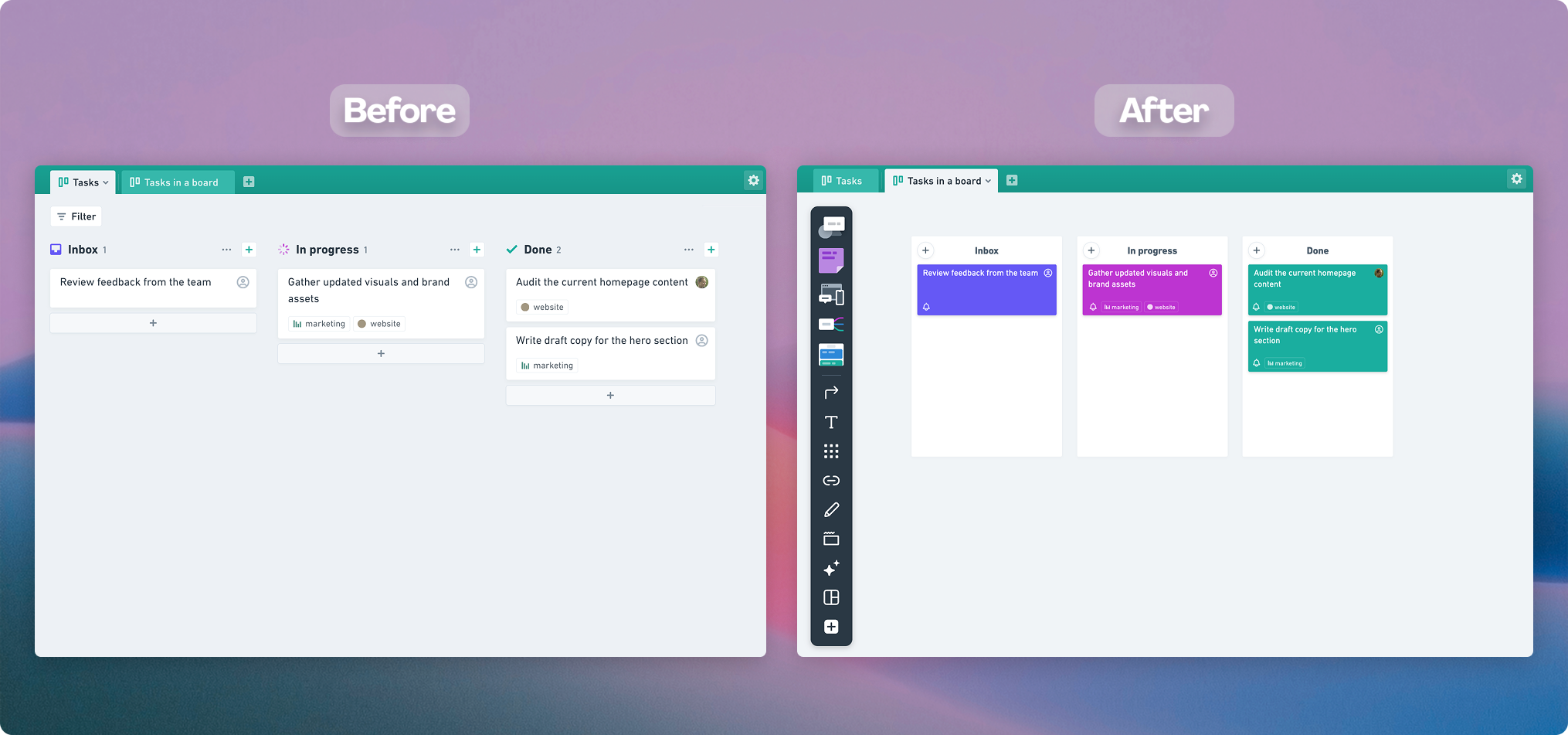
- Any tasks in boards that are linked to a Project, will remain on the board. They will lose the project link and due date, while the assignee, tags will remain. We will also keep the task status by carrying it over into a stack.
Here's how the task conversion will look like from tasks in a project to tasks in a board:
Can I export my project data?Copied!Link to this section
Yes, you can download all your project data as a CSV file. Each project can be exported individually as a CSV file.
Where can I find the export tool?Copied!Link to this section
Before 19 January:
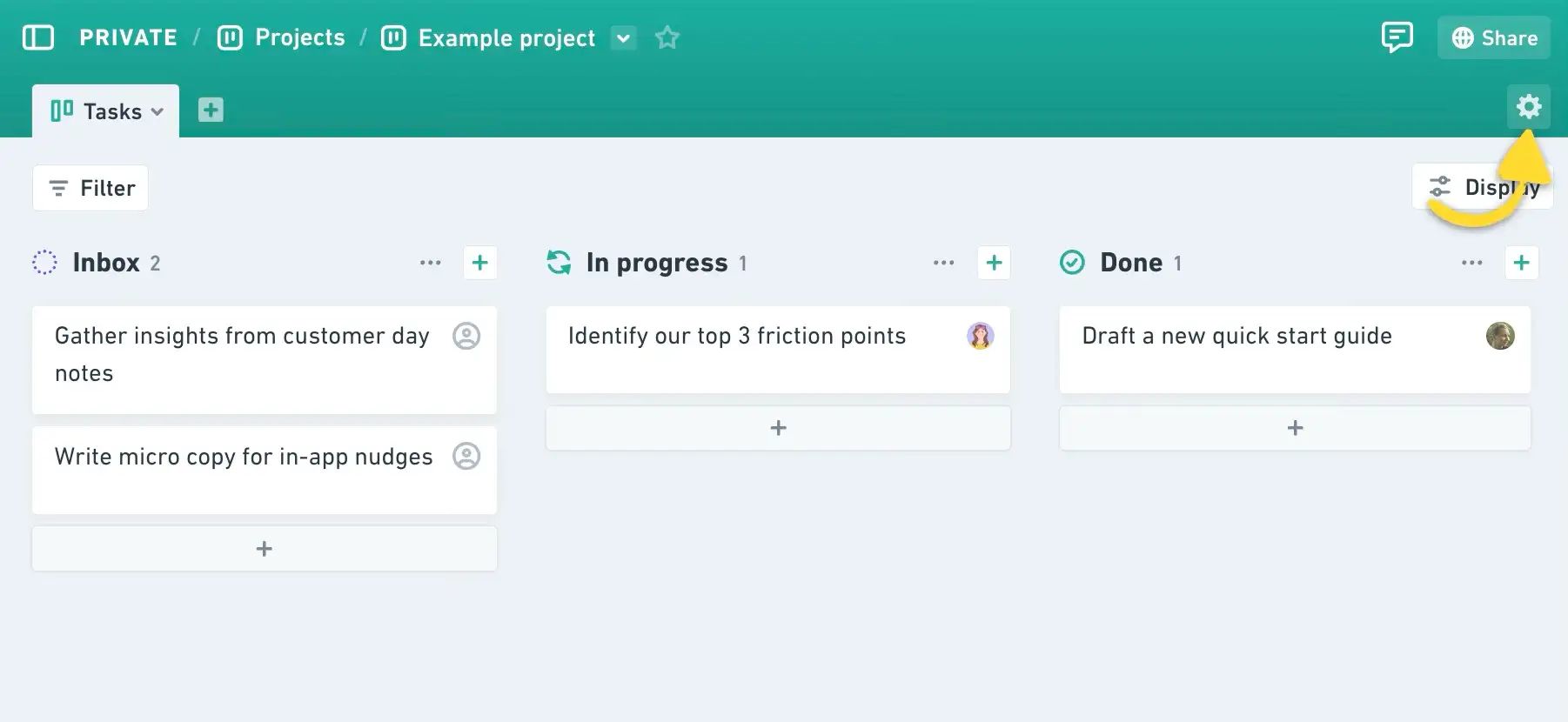
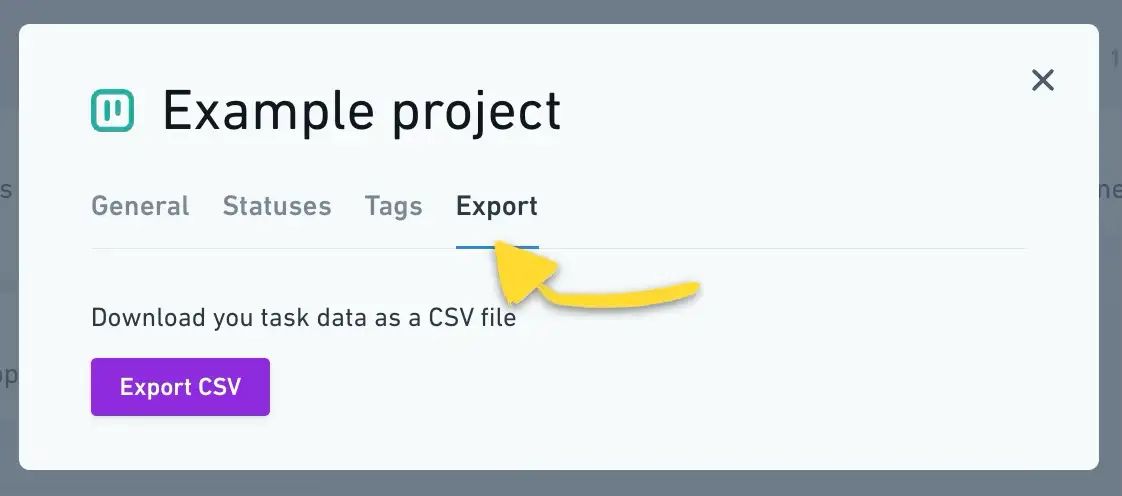
The export tool is available in your Project settings. Open any project, click the gear icon at the top right, and you'll see the Export tab there.
After 19 January:
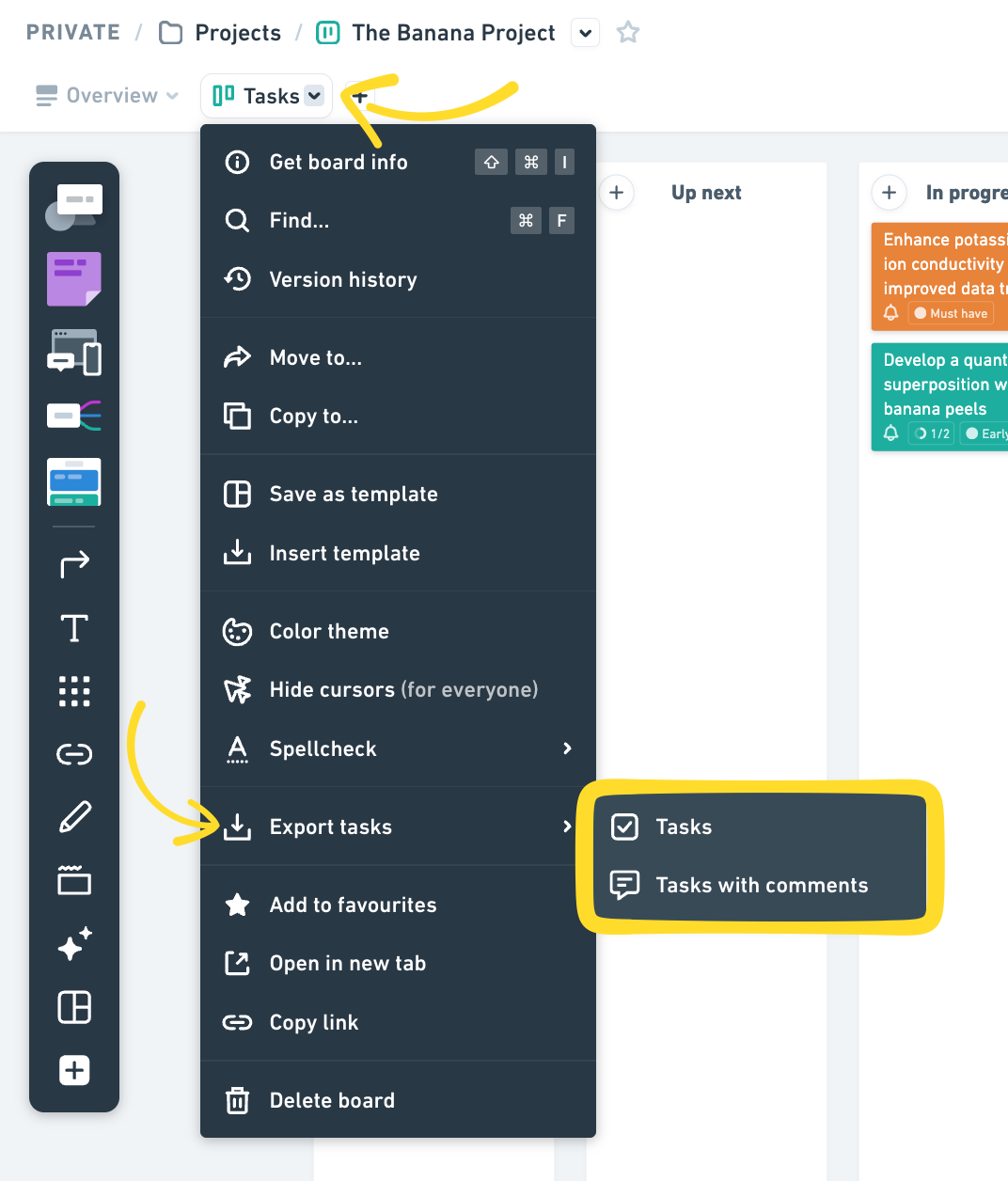
Open the board with your converted tasks, click the dropdown next to the file name, and choose Export tasks.
What can I do with the CSV export?Copied!Link to this section
- You can use the CSV export to move your project data into other project management tools like Linear, Asana, Shortcut or Jira.
- Our CSV works smoothly with Linear and shouldn’t require any changes. For other tools, it’s a good idea to double check their import rules since you might need to adjust a few column names before uploading.
How do I export my tasks using the CSV export?Copied!Link to this section
Before 19 January:
Each project can be exported individually as a CSV file. Open the project, click the gear icon at the top right to open project settings → select Export → Export CSV.
After 19 January:
Open the board with your converted tasks, click the dropdown next to the file name, and choose Export tasks:
When is the last day I can export my projects and tasks?Copied!Link to this section
The Projects export tool will remain available until January 19, 2026.
After that, you’ll still be able to export your tasks once they’ve been converted into a board. To do that, open the board with your tasks, click the dropdown next to the file name, and choose Export tasks:
Is there a replacement or alternative tool you recommend?Copied!Link to this section
- For simpler planning: You can keep using Whimsical. Tasks on boards work great for visualizing plans, especially for non-engineering teams. While they don't support due dates or tags like project tasks did, you can still organize tasks in boards stacks by status, use color coding, and assign owners for high-level planning.
- For end-to-end project management: We've moved most of our projects to Linear, but the right tool depends on your needs. Popular alternatives include Shortcut, Jira, Basecamp, ClickUp and Trello.
What will happen to tasks in boards?Copied!Link to this section
Tasks in boards will stay available and fully functional. If a task was previously linked to a project, that connection will be removed. Starting January 15, tasks in boards won’t include due dates. Everything else will continue working as usual, so you can keep using boards for simple planning and tracking.
Can I still create new projects before January 19?Copied!Link to this section
- Yes, you can still create new Projects or keep working in your existing Projects until January 19, 2026. That said, we recommend using this time to find an alternative solution that fits your needs, since we are phasing these features out.
- New workspaces created after November 17, 2025 will not have access to Projects, Posts, or Tasks.
Can I convert Projects to folders with boards and docs manually before the automatic conversion?Copied!Link to this section
No, there isn’t a way to manually convert Projects ahead of time. All Projects will be automatically converted into folders with boards and docs in them starting from January 19, 2026.
What happens to project permissions and sharing settings?Copied!Link to this section
Once Projects are converted into folders with boards and docs in them, they will keep the same permissions they originally had. Everyone will keep the access they already have, and no additional people will be added when the conversion happens.
Where can I give feedback or ask questions about this decision?Copied!Link to this section
If you have questions or need help with the transition, please reach out to our support team.
Summary
- Whimsical Projects Sunset FAQ
- Why are you removing these features?
- What features are affected?
- When will I lose access to these features?
- What will happen to my existing content created in Projects?
- Can I export my project data?
- Where can I find the export tool?
- What can I do with the CSV export?
- How do I export my tasks using the CSV export?
- When is the last day I can export my projects and tasks?
- Is there a replacement or alternative tool you recommend?
- What will happen to tasks in boards?
- Can I still create new projects before January 19?
- Can I convert Projects to folders with boards and docs manually before the automatic conversion?
- What happens to project permissions and sharing settings?
- Where can I give feedback or ask questions about this decision?